

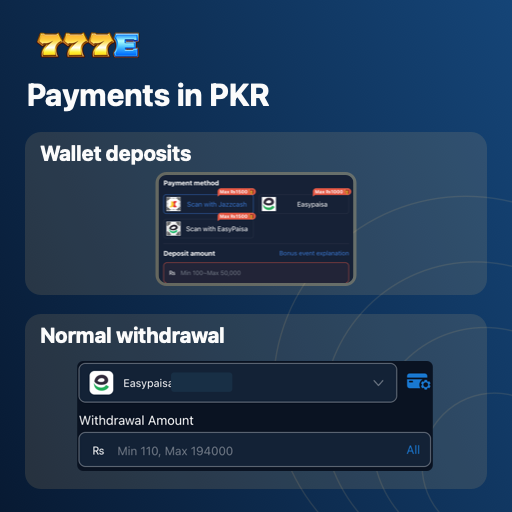
How to prepare a wallet deposit
The stated PKR deposit range is PKR 100–50,000 per transaction with no 777E fee. Check the selected channel before paying because the cashier may show a separate range or fixed amount. JazzCash QR and the Easypaisa form viewed asked for an 11-digit wallet number starting with 03. Use the QR for your current order. You can find the walkthrough by opening QR Payment Video Guide in Promo.
Open Deposit
In the lobby, choose Deposit and look under Online deposit.
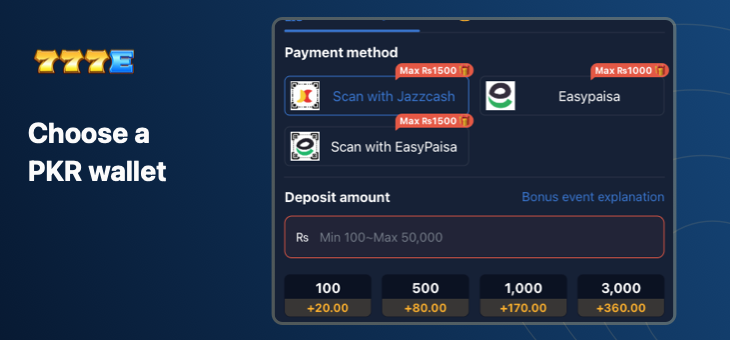
Choose the wallet method
For Online deposit, choose an available wallet method, such as Scan with Jazzcash, Easypaisa or Scan with EasyPaisa. Crypto is a separate option and may show USDT.
Check the amount and payer number
For QR payment, create the order using the amount and payer wallet details requested by the cashier. Save the QR generated for that order.
Save the receipt
In Easypaisa or JazzCash, scan the saved image from your gallery. Verify the receiver and amount before sending. Keep your receipt and return to 777E to check the order.
What to check for a deposit or withdrawal
Deposit in PKR
- PKR 100–50,000 per transaction.
- No 777E fee. Credit within 60 seconds, according to 777E.
- For a wallet payment, review the selected channel and keep the receipt.
Normal withdrawal in PKR
- PKR 110–194,000 per transaction. No daily withdrawal cap.
- No 777E fee. Review within 90 seconds and immediate credit after approval, according to 777E.
- Choose a receiving account such as Easypaisa or JazzCash and check the request status.
Crypto options
- Look under Crypto for the available deposit options, including USDT when shown. Convert to crypto is a separate withdrawal option.
- Use the asset, network and conditions shown for the current transaction.
The figures above apply to PKR payments. Check the amount and conditions for the option displayed in your account.
How to request and track a 777E withdrawal
Open Profile → Withdraw → Request withdrawal. Choose Normal withdrawal for a wallet payout and use Receiving account to check the destination.
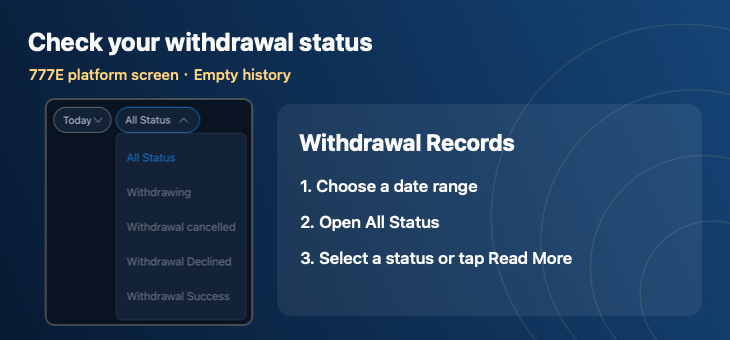
Enter PKR 110–194,000 and verify your withdrawal password in 777E. Open Withdrawal Records, change Today to a longer date range or select Read More if you see no results, and open All Status to filter requests.
Withdrawing means the request is still in progress. Withdrawal cancelled and Withdrawal Declined show that the request did not complete. If the record shows Withdrawal Success but your wallet has not credited it, check the receiving account and share the reference with Support before requesting again.
Wallet charged but 777E balance unchanged?
After the expected credit window, check both your wallet history and the 777E deposit record. If the wallet deducted the payment but you cannot see the credit, save the receipt, amount and transaction ID and contact Support before paying again.
If no money left your wallet, recheck the channel and the amount first. If the status is unclear, ask Support to check that transaction before paying again.
Use Support inside 777E. Keep wallet PINs and OTPs private.